Best Apps That Work With Oura Ring (2026)
The Oura integrations worth connecting on iPhone, including Apple Health, Strava, Natural Cycles, Clue, Stelo, and Headspace, plus what data each one shares.
Oura works with other apps in three ways: direct integrations you manage in the Oura app, Apple Health on iPhone, and the Oura API that independent apps use. Most people only need one or two connections. This guide covers the ones worth setting up first and what data each one actually shares. Oura's partner integrations
About this list: We make Ring Widget, which appears below and is labeled as our app. Everything else is based on Oura's integration documentation, not paid placement.
Oura integrations at a glance
| App | What it does with Oura | Worth it if |
|---|---|---|
| Apple Health | Shares sleep, heart rate, steps, and workouts both ways | You use any other health app on iPhone |
| Strava | Swaps workouts with Oura and adds scores to activities | You log runs or rides in Strava |
| Natural Cycles | Uses Oura temperature data for cycle tracking | You use Natural Cycles for birth control or cycle tracking |
| Clue | Receives sleep, heart rate, HRV, and temperature trends | You track your cycle in Clue |
| Stelo by Dexcom | Shows glucose in Oura (US only) | You wear a Stelo glucose sensor |
| Headspace | Adds guided sessions inside the Oura app | You want breathwork without another app |
| Ring Widget (our app) | Shows Oura metrics in widgets | You want scores without opening an app |
Apple Health: the hub for everything else
Apple Health is the most useful connection on iPhone because many other apps read from it. Oura writes sleep, heart rate, steps, workouts, respiratory rate, and mindful minutes to the Health app. It reads workouts, Cardio Fitness, weight, and other data back. On Gen3 and later rings, it requires an active membership. Oura's Apple Health guide
Oura names Flo and MyFitnessPal as examples of apps that can use your Oura data through Apple Health. If you also wear an Apple Watch, set which device Apple Health trusts for steps so they are not counted twice; our new Oura Ring checklist shows how.
Strava: workouts in both directions
The Strava integration works both ways. Oura can send workouts with heart rate data to Strava, along with your Readiness and Activity scores, and Strava sends your recorded workouts to your Oura Timeline. It requires a Gen2 ring, or a Gen3 or later ring with an active membership. Oura's Strava guide
That makes Strava a good choice if you already record runs, rides, or hikes there: Oura gets the workouts without manual entry, and your Strava activities show the recovery context behind them.
Natural Cycles: temperature for cycle tracking
Natural Cycles is an FDA-cleared birth control app. Oura sends the temperature trend from each night to Natural Cycles, which uses it to estimate your daily fertility status. Nothing else is shared, so you still log periods in Natural Cycles. You need a Natural Cycles subscription, and Gen3 or later rings also need an Oura membership. Oura's Natural Cycles guide
To connect, open Natural Cycles, go to Menu → Settings → My device, and link your Oura account. After your next night, open Oura in the morning and let it sync.
Clue: cycle tracking with recovery context
Clue receives your sleep, resting heart rate, HRV, and temperature trends from Oura and shows them alongside your cycle. It is the lighter option if you want context for your cycle rather than a birth control method. Oura's partner integrations
Other women's health partners include Mira, Oova, Peanut, Stardust, and Alloy Health.
Stelo by Dexcom: glucose next to your Oura data
Stelo is an over-the-counter glucose biosensor from Dexcom. With the integration, your glucose readings appear in the Oura app's Today and Vitals tabs, so you can see them alongside the rest of your day. Data only flows from Stelo to Oura. It requires a US account and App Store, an active membership, a Gen3 or later ring, iOS 16.2 or later, and English as the phone language. Other Dexcom sensors are not supported. Oura's Stelo guide
Headspace: guided sessions inside Oura
The Headspace partnership adds fifteen breathwork and meditation sessions to the Oura app. You do not need to switch apps to do them. Oura's partner integrations
Ring Widget: Oura scores on your Home Screen (our app)
Oura's own widgets cover Sleep on the Home Screen and a few scores on the Lock Screen. Ring Widget adds widgets for Readiness, Sleep, Activity, Daily Movement, Daytime Stress, Cardio Age, VO2 max, body temperature, and ideal bedtime on iPhone, iPad, Mac, and Apple Watch. It connects through Oura's official API and authorization screen, so Oura handles your password.
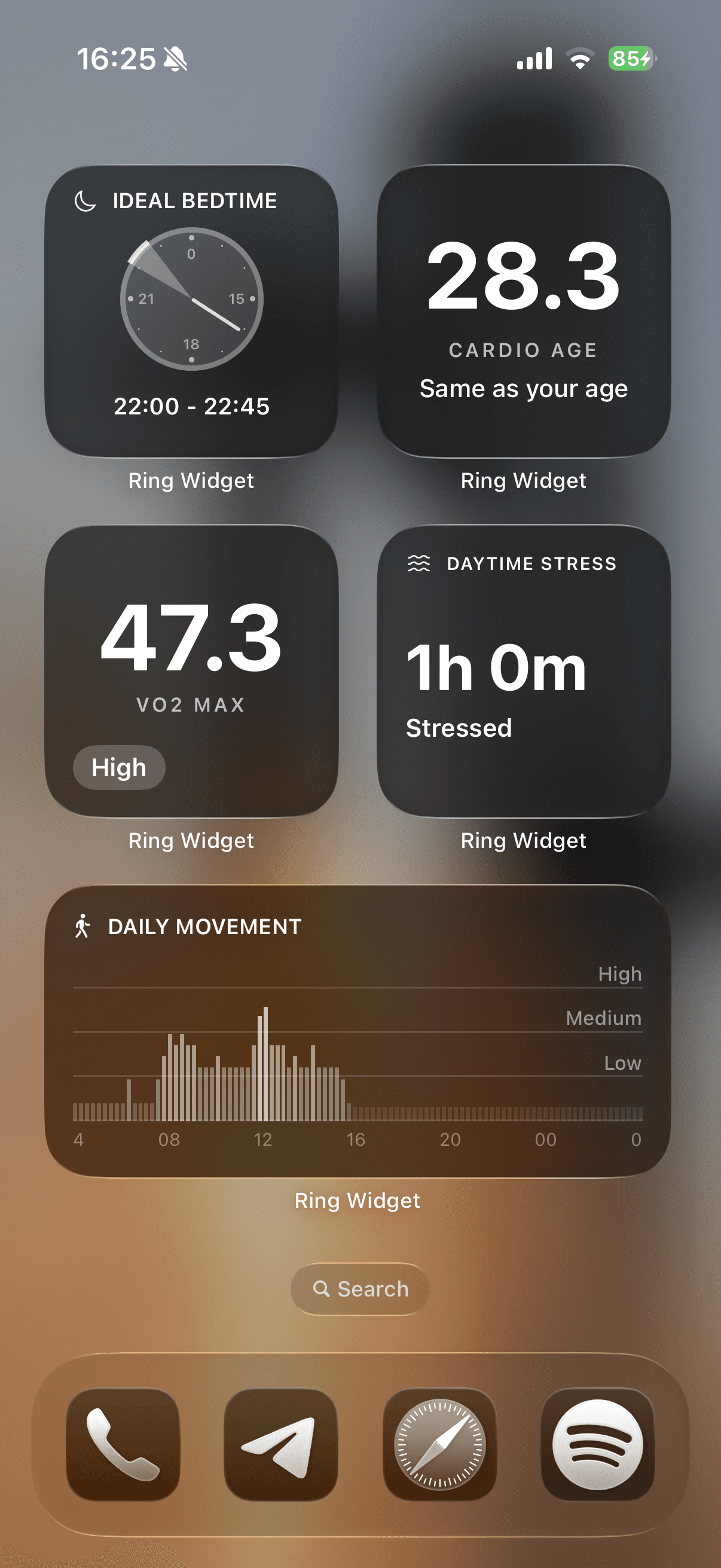
Readiness and Sleep widgets are free; other layouts require a purchase. Our iPhone widget setup guide covers the steps.
Other integrations worth a look
Oura's partner list is longer than most people expect. A few more that may fit your routine:
- Cronometer: nutrition tracking with your sleep and activity data
- Zero: fasting logs alongside your Oura data
- Migraine Buddy: your sleep and cycle data next to migraine logs
- CorePower Yoga and The Sculpt Society: workout suggestions based on your Readiness
- Apple Watch: Oura's own companion app and complications; see our Apple Watch guide
How to connect or remove an integration
Most direct integrations live in the Oura app under Settings → App Integrations, and you can revoke access there at any time. Some require an active membership. Oura's partner integrations
Apple Health permissions are managed separately in iPhone Settings → Health → Data Access & Devices. Apps that use the Oura API, including Ring Widget, ask for permission on Oura's own authorization screen.
Before connecting a new app, check what data it receives and whether it sends anything back. Connecting fewer apps you actually use beats connecting everything once.
Download Ring Widget free to keep your Oura scores on your Home Screen.
Sources
- Partner Integrations — Oura Member Care
- Apple Health Integration — Oura Member Care
- Strava Integration — Oura Member Care
- Natural Cycles Integration — Oura Member Care
- Stelo by Dexcom Integration — Oura Member Care
- The Oura API — Oura Member Care