Oura Ring Features You're Probably Not Using
Rest Mode, Health Radar, tags, Resilience, Oura Advisor, and bedtime guidance: Oura features that are easy to miss, what they need, and when each one helps.
Most Oura owners check three scores each morning and never open the rest of the app. Readiness, Sleep, and Activity are a good start, but Oura also includes features for sick days, long-term heart health, stress, and habit tracking. Several of them only switch on after you have worn the ring for a week or two, which is why they are easy to miss.
Here are the features worth knowing about, what each one needs, and when it is useful. Most require a Gen3 or later ring with an active membership.
Rest Mode for sick days, injuries, and travel
When you turn on Rest Mode, Oura pauses your activity goal and Activity Score and adjusts your Readiness and Sleep insights toward recovery. Your steps and movement are still recorded. It is meant for days when you are ill, injured, or jet-lagged and a missed activity goal would only add pressure. Oura's Rest Mode guide
Turn it on from the menu in the Today tab. Oura may also suggest it with a card when your body temperature is elevated. After you turn it off, your activity metrics ease back over up to seven days.
Health Radar and Symptom Radar
Health Radar brings Oura's heart, breathing, and strain signals together in the My Health tab:
- Symptom Radar watches for short-term changes in temperature, breathing rate, resting heart rate, and HRV that can mean your body is under strain, and labels them as no, minor, or major signs. Symptom Radar
- Nighttime Breathing shows a 30-day view of breathing disruptions during sleep.
- Blood Pressure Signals looks for blood-pressure-related patterns in your nighttime data. It does not measure blood pressure in mmHg.
Health Radar is a wellness feature, not a diagnosis, and it is available in selected countries. Symptom Radar needs at least seven nights of sleep data in the past 14 days. Oura's Health Radar guide
Tags that explain your scores
Tags record things like caffeine, alcohol, a late meal, a sauna session, or travel. They do not change your scores; they let you compare your sleep and Readiness on days with and without a habit. Oura has more than 100 tags, you can create custom ones, and you can set a tag to repeat daily. Using tags in Oura
On days when your Sleep Score is unusually high or low, Oura may suggest tags during your first sync of the morning. With at least 14 days of data in the past 30, the Discovery Hub can start pointing out patterns.
Daytime Stress and Resilience
Daytime Stress shows your stress levels during the day in four zones: stressed, engaged, relaxed, and restored. It is calibrated against your own baseline and needs at least five days of continuous wear. Daytime Stress
Resilience zooms out. It combines your daytime stress, daytime recovery, and nighttime recovery over 14 days into a level from Limited to Exceptional. A single stressful afternoon matters less than a stretch with little recovery. Resilience
Cardio Capacity and Cardiovascular Age
Two heart health features sit in My Health → Heart Health. Cardio Capacity estimates your VO2 max, and a six-minute walking test makes the estimate more personal. Cardiovascular Age compares how your cardiovascular system looks with your actual age and needs at least 14 nights of data.
Both change slowly, so a monthly check is enough. Our guides explain the Oura VO2 max estimate and Cardiovascular Age in more detail.
Oura Advisor
Oura Advisor is an AI assistant in the app that answers questions using your scores, activities, tags, and profile. You can ask why your Readiness dropped, or how last week compared with the week before. You can adjust its style, review what it remembers, and reset it. It is not a medical service. Oura Advisor
Our Oura Advisor guide covers who can use it, questions worth asking, and how its memories work.
Bedtime guidance
Oura suggests an ideal bedtime based on your own sleep history rather than a generic rule. Because it depends on your data, it needs time to appear and you cannot edit it. Oura's bedtime guide
The suggestion is most useful in the evening, when you are deciding whether to stay up. That is also when you are least likely to open the Oura app.
Battery notifications
Oura can warn you when the ring's battery is low. Turn it on in Settings → Notifications in the Oura app. Without it, a flat battery can quietly cost you a night of data. Oura's battery guide
Our Oura Ring battery guide covers battery life by generation and how to see the charge from your Home Screen.
Keep the features you use in view
Features you never see are easy to forget. Ring Widget is an independent app that puts Oura metrics in widgets, including Daytime Stress, Cardio Age, VO2 max, body temperature, and ideal bedtime. Two Lock Screen shortcuts open the Oura app for you: Log a Meal opens meal logging, and Advisor opens Oura Advisor.
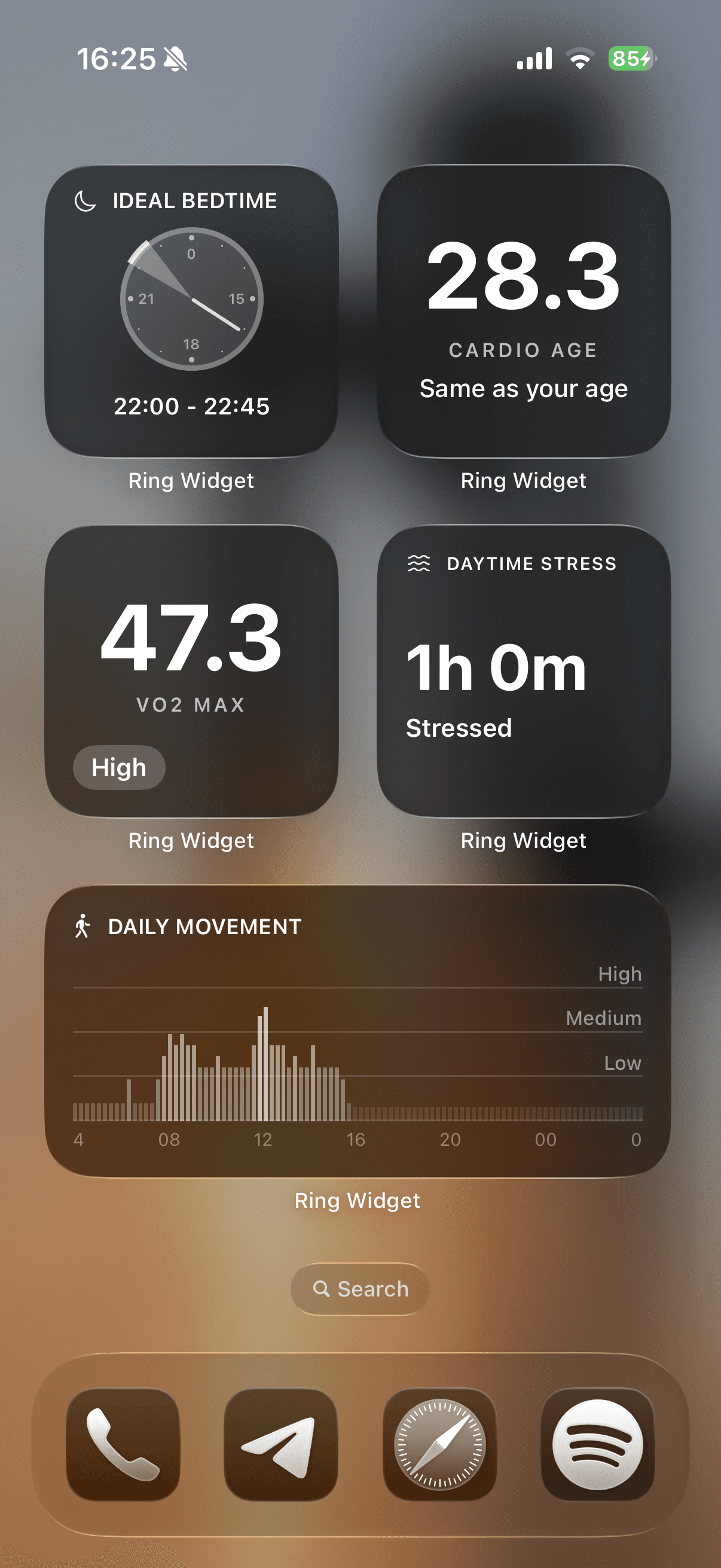
Our iPhone widget setup guide walks through adding them. Download Ring Widget free; Readiness and Sleep widgets are free, and other layouts require a purchase.
Sources
- Rest Mode — Oura Member Care
- Health Radar — Oura Member Care
- Symptom Radar — Oura Member Care
- Using Tags — Oura Member Care
- Daytime Stress — Oura Member Care
- Resilience — Oura Member Care
- Oura Advisor — Oura Member Care